

SurveyGPS SIMA,SFC読込~GPSで既知点調査
You can search for known points with GPS, register new point positions with GPS, connect, and output with SIMA.
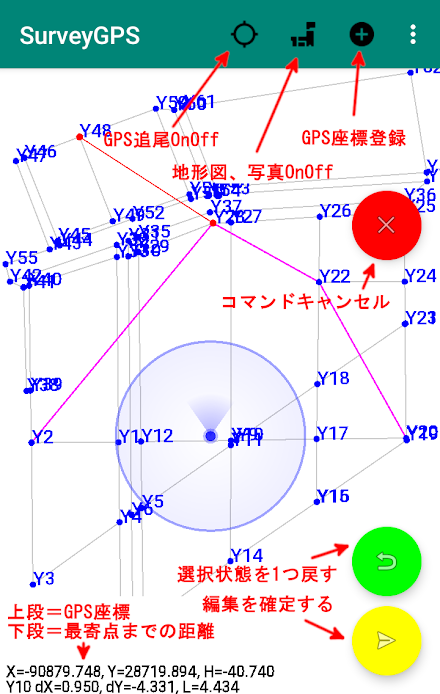
You can also check the coordinates on the spot by putting the coordinates in the terminal.File Create New - Discard the current data.Open - Open the saved data (the previously saved data will automatically open at startup)Save - save the data.Save as - Save the data under a different name. File delete - Delete the saved file. SIMA read - read SIMA files. SIMA Save - Outputs the current data to a SIMA file. SFC read - read the SFC file. SFC data clear Discards the read SFC.GPS settingsUse - use GPS. Coordinate display-Converts GPS coordinates into planar rectangular coordinates and displays them. Proximity point display-Displays the distance to the point closest to the GPS coordinates. Character ○ - Change the character size of the GPS coordinates.editManual input of coordinate values - Manually input plane rectangular coordinates. Coordinate tap registration-Tap the coordinates on the screen to register them.Delete Coordinates - Select and delete coordinates on the screen.Line drawing - Select points on the screen and connect them.Delete line - Select and delete a line on the screen.intersection calculation"Do various intersection calculations."setting Coordinate system setting - Set the local plane rectangular coordinate system. Display color setting - Set the display color of points, lines, etc. Map Download - background map download OnOffClear Map Cache Deletes downloaded background maps and photos.others Whole display-Displays the whole. Overview recalculation-Recalculate the entire display area with the current coordinates. Distance and angle measurement-Measure the distance between points and the angle of 3 points. Coordinate list confirmation-Display the coordinate list (X, Y, H).Angle measurement modeMeasure the approximate angle on site.HUD mode"Heads-up display mode." Regarding accidents while using a car,"We do not take any responsibility.""Press and hold to change the color of the text." (three-color loop)"Flick to reverse the characters."privacy policyYou can check the privacy policy of this app on the website.* There are restrictions on folders that can be used depending on the OS version.*Since the SFC reading function was originally created, there is a possibility that the display may become strange.
(Only points, lines, circles, arcs, and text are displayed.
Monochrome display.
Text is displayed horizontally.
Line types have their own spacing.)* You can check the coordinates by pressing and holding the point on the screen.*Please check the coordinate system if the GPS position and the position of the local point are significantly separated.* GPS accuracy depends on the accuracy of the terminal.* Map data will be accumulated in the built-in storage.Communication charges will be incurred, so if you want to save money, you can save by downloading the necessary local range in advance in the Wifi environment.If the terminal capacity is low, please clear the background data.* When downloading the map, please operate slowly.You may not be able to download normally.
About SurveyGPS SIMA,SFC読込~GPSで既知点調査
- Package name (App ID)
- kty.surveygps
- Available on
- Google Play
- Price
- $0.75
- Developer
- kty
Looking for the SurveyGPS SIMA,SFC読込~GPSで既知点調査 APK?
The safest way to get SurveyGPS SIMA,SFC読込~GPSで既知点調査 (kty.surveygps) on your Android device is to install it directly from Google Play — you'll always get the latest official version, automatic updates, and no risk of modified or infected APK files from third-party sites.

Social Features
Connect and share with friends and the community.
Gaming Features
Enjoy immersive gaming experience with various game modes.
Camera Features
Advanced camera features with editing capabilities.
See SurveyGPS SIMA,SFC読込~GPSで既知点調査 in Action


Frequently Asked Questions
Is SurveyGPS SIMA,SFC読込~GPSで既知点調査 free?
SurveyGPS SIMA,SFC読込~GPSで既知点調査 is a paid app — it costs $0.75 on Google Play. You pay once through your Google account and can install it on your Android devices.
How do I install SurveyGPS SIMA,SFC読込~GPSで既知点調査 on Android?
Open Google Play on your Android phone or tablet, search for SurveyGPS SIMA,SFC読込~GPSで既知点調査 by kty or tap the Google Play button on this page, then tap Install. The app downloads and installs automatically.
What is kty.surveygps?
kty.surveygps is the App ID (package name) of SurveyGPS SIMA,SFC読込~GPSで既知点調査 on Google Play. Every Android app has a unique package name, and it is the safest way to verify you are installing the official app.
Is SurveyGPS SIMA,SFC読込~GPSで既知点調査 safe to download?
Installing SurveyGPS SIMA,SFC読込~GPSで既知点調査 from Google Play is the safest option: you get the official version published by kty, verified by Google Play Protect, with automatic updates. Avoid APK files from unofficial third-party sites.

Get SurveyGPS SIMA,SFC読込~GPSで既知点調査 Today
SurveyGPS SIMA,SFC読込~GPSで既知点調査 for Android — $0.75 on Google Play.
Compatible with Android phones and tablets — available on Google Play.
Ask AI about this app
Get instant answers about features, tips and more from popular AI assistants.